Showing posts with label Embedded electronics. Show all posts

Tuesday, August 8, 2017

ARM architecture concept of Bit-Banding to solve problem of Race-condition in case of register value update

Two 1MB 'bit-band' regions, one in the peripheral memory area and one in the SRAM memory areas are each mapped to a 32MB virtual 'alias' region. Each bit in the bit-band region is mapped to a 32bit word in the alias region.
The first bit in the 'bit-band' peripheral memory is mapped to the first word in the alias region, the second bit to the second word etc.
Code example of using Bit-banding:

// Define base address of bit-band
#define BITBAND_SRAM_BASE 0x20000000
// Define base address of alias band
#define ALIAS_SRAM_BASE 0x22000000
// Convert SRAM address to alias region
#define BITBAND_SRAM(a,b) ((ALIAS_SRAM_BASE + (a-BITBAND_SRAM_BASE)*32 \    + (b*4)))
 
// Define base address of peripheral bit-band
#define BITBAND_PERI_BASE 0x40000000
// Define base address of peripheral alias band
#define ALIAS_PERI_BASE 0x42000000
// Convert PERI address to alias region
#define BITBAND_PERI(a,b) ((ALIAS_PERI_BASE + (a-BITBAND_PERI_BASE)*32 \    + (b*4)))
 
//Define some memory address
#define MAILBOX 0x20004000
//Define a hardware register
#define TIMER 0x40004000
 
// Mailbox bit 0
#define MBX_B0 *((volatile unsigned int *)(BITBAND_SRAM(MAILBOX,0))) 
// Mailbox bit 7
#define MBX_B7 *((volatile unsigned int *)(BITBAND_SRAM(MAILBOX,7))) 
// Timer bit 0
#define TIMER_B0 *((volatile unsigned char *)(BITBAND_PERI(TIMER,0))) 
// Timer bit 7
#define TIMER_B7 *((volatile unsigned char *)(BITBAND_PERI(TIMER,7)))
 
 
int main(void){    
    unsigned int temp = 0;
    MBX_B0 = 1// Word write    
    temp = MBX_B7; // Word read    
    TIMER_B0 = temp; // Byte write    
    return TIMER_B7; // Byte read
}

This is not the only solution to this problem.All common architectures have implemented mechanisms for atomically setting and clearing bits. ARM’s approach is elegant in that it can be exercised with ANSI C, while most others implementations require special C extensions or the use of assembly language.

Wednesday, July 26, 2017

Clarification on various terms of Embedded microcontrollers

Memory access Architectures:


  • Von-neumann:

Code and data memory on same memory address map
Only one set of address and data bus shared for code, data memory

  • Harvard

Code and data memory on separate memory address map
Two set of address and data bus, one for each memory
eg. 8051, PIC

  • Modified Harvard

1. Almost harvard

Code and data memory on separate memory address map.
But, instruction can be stored on data memory (like SRAM), or data can be stored on Code memory (like FLASH). For accessing data from code memory special instructions are provided.
eg. AVR8

2. Almost von-neumann

Code and data memory on same memory address map
But internal to CPU architecture there are separate instruction and data cache.
Depending on the coherency between the data and instruction cache there are two types:
     a. With coherence (eg. x86, x64)
     b. Without coherence (eg. ARM)
NOTE: Here in ARM architecture, there are possibility of problems with coherency. In order to avoid this the variables should be defined volatile as far as possible. This makes sure, after every operation the output is stored back to SRAM rather than just keeping it on cache and using it for next operation.

Interesting article for the explanation:
http://ithare.com/modified-harvard-architecture-clarifying-confusion/

CPU architecture:


  • 8051

8051is a harvard architecture. Good for small applications, but for big applications where data processing size requried is more. Number of vectored interrupts are less. Lack of memory management unit on chip.

  • PIC

Good for applications where lot of peripheral support required on silicon. It has very small stack memory.

  • AVR

Modified Harvard architecture for 8bit data processing. Good for small applications

  • ARM

Most advanced architecture with memory management, nest vectorred interrupt controller, debug and trace units with support for SWD and JTAG. Capable of operating at high frequencies.

Instruction sets:

  1. CISC - complex instruction set machine

Code size less
Pipelining cant be implemented
Time per instruction not the same.

  1. RISC - reduced instruction set machine

Code size more
Pipelining can be implemented
Time per instruction the same.
Instruction execution statictics are measured in DIPS(Dhrystone instructions per second) or MIPS (milion instruction per second)

Friday, July 21, 2017

Practical significance of Bitfield, union and Structure

/**
  \brief  Union type to access the Special-Purpose Program Status Registers (xPSR).
 */
typedef union
{
  struct
  {
    uint32_t ISR:9;                      /*!< bit:  0.. 8  Exception number */
    uint32_t _reserved0:7;               /*!< bit:  9..15  Reserved */
    uint32_t GE:4;                       /*!< bit: 16..19  Greater than or Equal flags */
    uint32_t _reserved1:4;               /*!< bit: 20..23  Reserved */
    uint32_t T:1;                        /*!< bit:     24  Thumb bit        (read 0) */
    uint32_t IT:2;                       /*!< bit: 25..26  saved IT state   (read 0) */
    uint32_t Q:1;                        /*!< bit:     27  Saturation condition flag */
    uint32_t V:1;                        /*!< bit:     28  Overflow condition code flag */
    uint32_t C:1;                        /*!< bit:     29  Carry condition code flag */
    uint32_t Z:1;                        /*!< bit:     30  Zero condition code flag */
    uint32_t N:1;                        /*!< bit:     31  Negative condition code flag */
  } b;                                   /*!< Structure used for bit  access */
  uint32_t w;                            /*!< Type      used for word access */
} xPSR_Type;

xPSR_Ttpe APSR;

uint32_t var1 = APSR.w;  // If we want to access as a word. Underneath Load Store Instruction
uint8_t var2 = APSR.b.IT;  //If we want to read from bit 25 and 26 only. Under neath Bitfiled instruction.

Hence union brings the freedom of access to a particular register. 

Code provision for handling Little endian and Big endian schemes

Following text is copied from the following linkof Keil ARMCompiler:
http://www.keil.com/support/man/docs/armcc/armcc_chr1359124215078.htm
This is completely for my own reference

#ifndef __BIG_ENDIAN // bitfield layout of APSR is sensitive to endianness
typedef union
{
    struct
    {
        int mode:5;
        int T:1;
        int F:1;
        int I:1;
        int _dnm:19;
        int Q:1;
        int V:1;
        int C:1;
        int Z:1;
        int N:1;
    } b;
    unsigned int word;
} PSR;
#else /* __BIG_ENDIAN */
typedef union
{
    struct
    {
        int N:1;
        int Z:1;
        int C:1;
        int V:1;
        int Q:1;
        int _dnm:19;
        int I:1;
        int F:1;
        int T:1;
        int mode:5;
    } b;
    unsigned int word;
} PSR;
#endif /* __BIG_ENDIAN */

/* Declare PSR as a register variable for the "apsr" register */
register PSR apsr __asm("apsr");

void set_Q(void)
{
    apsr.b.Q = 1;
}

Thursday, July 20, 2017

Why the provision of executing code from SRAM if FLASH is already there on Chip for Microcontroller ?

This has always been a question for me.

FLASH is the area where it is supposed to store the Application instructions.
SRAM is supposed to be used for storing global, static and local variables.

So, why there is sometimes provision provided in micro-controllers to load the code on SRAM and then execute.

Well I found these reasons. Correct me if I am wrong.
- Code execution from SRAM is almost 3 times faster compared to executing from FLASH.
- There are some techniques like instruction pre-fetch buffering, to store the instructions in CPU before it executes. But still SRAM has added advantage over this.
- SRAMs are costly compared to FLASH hence they are usually less in size compared to FLASH on-chip

Tips:
Interrupt service routines(ISR) are the piece of codes that are usually required to be executed very fast. So it might be good idea to store the interrupt routines on SRAM along with the Interrupt vector table.

Developing code from scratch for Bare metal microcontroller

Step1:

Go through the datasheet and technical reference manual of the micro-controller (MCU). Search on the manufacturer website for 

  1. Header files of registers of MCU
  2. HAL layer to reduce the effort of creating from scartch.
  3. If above options are not available then prepare header file on your own by referring to memory map
Example
mcu123.h
...
...
#define ADC1_base 0x08000100
#deinfe ADC2_base 0x08000200
...
...

Step2:

Create user file where all structures will be there to address every register in MCU
user_mcu123.h

/**
 * Bit fields
 */
typedef struct {
  uint32_t ADRDY_MST : 1;  // BIT 0
  uint32_t EOSMP_MST : 1;  // BIT 1
.
.
.
} ADC_CFGR_t


typedef struct {
  uint32_t RESERVED : 3;  //  Bits 0,1,2 reserved
  uint32_t SMP1 : 3;  // BIT 3,4,5
  uint32_t SMP2 : 3;  // BIT 6,7,8
.
.
.
} ADC_SMPR_t

/**
* Structures
*/
typedef struct {
  ADC_CFGR_t CFGR;  // Offset = 0x00000000
  ADC_SMPR_t SMPR;  // Offset = 0x00000004 these are arranged as per the memory map
} ADC_t

Step 3:

user_main.c
volatile ADC_t * const ADC1, * ADC2  //declare two pointers which will of required data type
ADC1 = (ADC_t *) ADC1_base;
ADC2 = (ADC_t *) ADC2_base;

NOTE: There is reason for declaring volatile and const in such fashion for ADC1 and ADC2.
ADC1/2 is a pointer which is constant, but the memory map location to which is points can change. Memory location to which it points is volatile because we are telling compiler that the content of that memory location can change out of sync to the program flow. So restrains compiler from making and optimization to this object  and removing from compiler output.

Memorymap IO and Port mapped IO

Memory mapped IOs:

All memory and IOs that are addressed using same memory map are called Memory mapped IOs
eg. Motorola

Memory_mapped_io.png

Port Mapped IOs:

Method in which, memory is mapped on one memory map, while IOs are mapped on different memory map is called Port mapped IOs
So here with same address, either IOregister / memory location can be accessed depending upon teh IORQ line value

So if any architecture says it has Port mapped IOs, then it should have a separate instruction for performing fetch from memory and fetch from IO.

NOTE: IORQ line is completely handled by CPU hardlogic after decodiong instruction. User code can't access it through some instruction call.

eg. Intel

Port_Mapped_io.png

http://www.bogotobogo.com/Embedded/memory_mapped_io_vs_port_mapped_isolated_io.php

Callback and Interrupt service routines, one and the same thing.

Interrupts in baremetal:


void ISR_UART1(void) {
    task_a();
    task_b();
    task_c();
}

void ISR_ADC1(void) {
    task_1();
    task_2();
    task_3();
}

void ISR_ADC2(void) {
    task_10();
    task_20();
    task_30();
}

Interrupt vector table


SrNo Address Callback function
1 0x00000000 RESET
2 0x00000014 ISR_UART1
3 0x00000018 ISR_ADC1
4 0x0000001C ISR_ADC2

Here, ISR_UART1(), ISR_ADC1(), ISR_ADC2() are callback functions. They are getting called whenever and Interrupt occurred. When Interrupt occurs, the Program counter is filled with address from above vector table as per the interrupt type. Next step, it interprets the value at this location as function pointer and goes to particular location as mentioned by user.

After RESET, the program counter(PC) gets the next value as per the BOOT pin configuration. So after the Reset, the PC can get value which can be address of start location of FLASH/SRAM/Bootloader etc. as per the MCU specification.

Considering it enters the usercode, the startup code starts executing which is even before main(). Here the STACK, HEAP and instructions to fill vector table with appropriate callback function pointers is done. So the Stack pointer is initialized, Heap pointer is also initialized.

Once this process is done, the program counter is directed to main()

Conclusion: Interrupt service routines are actually callback functions whose address is passed to interrupt vector table. They get called back whenever interrupt occurs.

Thursday, April 6, 2017

float to int...Interesting difference between TYPECASTING and Ceiling/Flooring/Truncating/Rounding

int a;
float b = 3.45f;
b = b * 3.142f;  /* which is 10.8399
a = (int)b;
printf("%f, %d", b,  a);

here b = 10.8399 and a = 10

this above mentioned method is where, typecasting is used for float to int conversion.
This is not the right way always.
Because it depends on the standards that are used when writing the compiler. How compiler will replace this conversion process.
Usually in C99, it uses truncation when converting float to int. But its not usually desirable, as you can see in the above example use expect it would be 11 rather than 10.

So, in these scenarios one should always use float to int conversion method as per the requirement of the application. There are functions readily available in math.h

  1. ceiling: eg. 10.78-> 11; 10.44 -> 11; 7.5->8; -11.89 -> -11; -11.14->-11; -7.5 -> -7
  2. flooring: eg. 10.78-> 10; 10.44 -> 10; 7.5->7; -11.89 -> -12; -11.14->-12;  -7.5 -> -8
  3. truncating: eg. 10.78-> 10; 10.44 -> 10; 7.5->7; -11.89 -> -11; -11.14->-11; -7.5 -> -7
  4. rounding: eg. 10.78-> 11; 10.44 -> 10; 7.5 -> 8; 8.5->9; -11.89 -> -12; -11.14->-11; -7.5 ->-8; -8.5->-9
  5. rounding even:  eg. 10.78-> 11; 10.44 -> 10; 7.5 -> 8; 8.5->8; -11.89 -> -12; -11.14->-11; -7.5 -> -8; -8.5->-8
I think this is a very important point when your application is demanding precision. Hope it helps

Tuesday, April 4, 2017

Effect of variable typecasting, on the underneath assembly code size


  1. Whenever we type-cast we are actually adding or no-effect on the number of instructions added to code.
  2. If lets say, the controller is 16-bit, and we have uint32_t a = 5, b; b = a *10;
  3. In this case b = a*10 will be performed in 2 parts multiplication. Hence a single multiplication will be replaced by two multiplications
  4. If we typecast it like, b = (uint16_t)a * 10; then it will be replaced by code which will be a single cycle multiplication operation.
  5. Int to float or vice-verse takes lot of time, as the numbers are representations are different and there will instructions of number conversion getting added. This will increase the processing time a lot, even though you see it as a simple one line multiplication in C code.
  6. Hence, always be careful when declaring float in the code. If you dont need that kind of precision, dont use it. Use Fixed point representation instead.
  7. Probably down casting a variable usually reduces the underneath instructions
  8. Processor lets say of 32bit will be optimally used if the data variables to be processed are of size 32bit

Thursday, March 16, 2017

INTERRUPT and EVENT....... Phantom in my head

Whenever a activity occurs, the activity is recognized by GPIO as an external interrupt / event.

  • So what is the difference between interrupt and event ?
  • When to use what ?
  • And finally to implement these concepts ?
When it comes to External Interrupt/ Event, GPIO should be configured in one of the following ways:
  1. External Interrupt, rising edge trigger
  2. External Interrupt, falling edge trigger
  3. External Interrupt, rising & falling edge trigger
  4. External Event, rising edge trigger
  5. External Event, falling edge trigger
  6. External Event, rising & falling edge trigger
In case of Interrupt, ISR related to that interrupt will executed by interrupting the execution flow of program. If the WFI(Wait for Interrupt) instruction is used by CPU to enter Sleep mode, any peripheral interrupt acknowledged by the nested vectored interrupt controller (NVIC) can wake up the device from Sleep mode.

In case of Event, no ISR is executed. If the WFE(Wait for Event) instruction is used by CPU to enter Sleep mode, the MCU exits Sleep mode as soon as an event occurs.


CPU - Sleep mode, is entered by executing the WFI (Wait For Interrupt) or WFE (Wait for
Event) instructions.

In general, external event is used to 
  • enter an ISR, i.e. connecting line to NVIC
  • toggling some bit in CORE register, to wakeup CPU
  • restarting some core clock
  • initiate DMA transfer etc.
Events are also generated Internal to MCU, by lets say DMA on half transfer, full transfer or error in transfer. So what event to handle and how to handle is a part of Event Management Block designer in CPU. Whats in our hand is know what all functionalities the Event management Block of MCU provided and then to configure it according to our application.

Monday, January 30, 2017

OPAMP parameters and configuration

Types of OPAMP:

  1. Voltage feedback opamp
  2. Current feedback opamp

NOTE: Mostly we use voltage opamps

Configurations:

  1. Voltage Amplifier: Voltage input, Voltage output 
  2. Current Amplifier: Current input, Current output
  3. Trans-impedance Amplifier: Current input, Voltage output
  4. Trans-conductance Amplifier: Voltage input, Current output
Parameters:
  1. Supply voltage range: (Offseted or Rail-to-rail): 
    • Rail to rail are preferred for better range of output voltage
    • This helps in using full range of ADC to which opamp output is connected
    • Otherwise ADC needs to be more precise i.e. more bits of ADC
  2. Single / Dual supply operation supported/ NOT:
  3. Input common mode voltage range
  4. Input impedance
  5. Output Voltage range
  6. Large signal voltage gain
  7. Gain Bandwidth Product:
    • Concept of Gain bandwidth product remaining the same, applies only to voltage feedback opamps
    • For current feedback opamps, feedback resistor is fixed
  8. Slew rate
  9. Output current Sink and source
  10. Input Bias current:
    • Very low for FETs and CMOS input stages
    • Compensation resistor can be added to reduce the bias current
    • But, it has a trade-off. It increases the johnson noise which in turns increases the noise voltage in the circuit
  11. Input offset current
  12. Input offset voltage
  13. Input noise voltage (nV/sqrt(Hz)): 
    • For calculating noise voltage introduced in the circuit = Input noise voltage x (sqrt (bandwidth of opamp))
    • Noise in the circuit also increases with increase in resistors outside the circuit
  14. Common Mode Rejection Ratio (CMRR)
  15. Power Supply Rejection Ratio (PSRR)
  16. Total harmonic Distortion
For precision opamps, following parameters are very important:
  • Input bias current (Ib) = ((Ib+) + (Ib-))/2
  • Input offset current (Iio) = ((Ib+) - (Ib-))
  • Input offset voltage (Vio)
  • Input noise voltage (Vn) = sqrt(4KTB)
  • Effect of temperature on Input offset voltage
  • Trade of between, Input bias current compensation v/s Input noise voltage

Friday, January 27, 2017

Electromagnetic Interference and considerations

Sources of EMI:

  1. Conducted EMI
  2. Radiated EMI
Mediums of EMI:
  1. Wires - conducted EMI
  2. Air/ Space - Radiated EMI
EMI is usually due to 
  • Near by RF transmitter for High frequency noise
  • Switch Mode Power Supply (SMPS) for medium frequency switching noise
  • Low frequency noise like from high voltage AC lines operating at 50Hz or so...
EMI noise is received into the circuit mainly because of 
  • Long tracks
  • Hanging wires
Compoenents like OPAMP may have the parameter EMIRR
  • Electromagnetic Interference Rejection Ratio
  • Better the EMIRR better is the EMI noise immunity of the compoenent
  • There are ESD protection diode inside the OPAMP
FCC limits


Circuit board layout tips:
  1. Keep all connectors on one side
  2. Don't keep high speed circuitary between connectors
  3. Poor decoupling
  4. Short traces for 
  5. Separate the low frequency (Analog signals) and high frequency (Digital signals) grounds i.e. place inductor or ferrite beads to connect grounds of low and high frequency plane
Follow link is a very good example of EMC

Points to consider when designing a circuit board:
  1. Design of ground plane
    • Separation of analog and digital planes
    • But care should be  taken between separting ground planes, because when the nearby connector  (analog and digital) have separate ground planes, this will introduce small potential difference between then, which cause connector cables emitting radiation
    • Coaxial cable have one signal and one ground casing.
    • Hence differential signals i.e. no need of ground plane is the best option to avoid high frequency noise on the ground plane
    • So, selecting OPAMP with differential input is necessary when the input signal is very sensitive to noise from ground plane
    • As C = Ae/d; A = common area of planes, d = distance between planes; so more widely spread power and ground planes, and closer the planes is the best for increasing the inherent capacitance between power and ground
    • Read concept of "common impedance coupling"
  2. Location of high speed circuitry
    • Metal enclosure of product is always better than a plastic enclosure, as metal shorts out the potential difference between the various connectors.
    • Eventually metal casing reduces the radiation to other circuitry, and increase the chances of clearing EMC requirements

  3. Analog signal current return path
    • Dedicated analog return(ground) path for low frequency (analog) signal, and connecting it to ground plane at one point will solve the problem
    • Read topic "Identifying current path"
  4. Routing of clock traces
    • Long distance clock traces are likely to emit EMI to other circuit. So minimize as far as possible
    • Routing clock at the edge of board is a bad idea as it increases coupling of noise of other nearby circuits
  5. Decoupling capacitors
    • Decoupling capacitors should be close (local decoupling) to VDD of IC when the power and ground plane are separated by distance more than 1mm (Far placed)
    • Decoupling capacitors can be placed away from the ICs when the power and ground plane are placed close as 0.25mm
    • If power plane is farthest from the components, then decoupling capacitors should be placed close to VDD
    • If ground plane is farthest from the components, then decoupling capacitors should be placed close to GND
  6. Power Integrity
    • This means adequate decoupling
  7. Noise immunity
    • Radiating emission structures on board are usually of lengths greater than 1/10th of the wavelength of signal they carry
  8. Immunity to ESD and fast transients
    • Filter io and power lines

Wednesday, November 16, 2016

Embedded Toolchain selection criteria's

For selecting proper toolchain for your embedded project following are the questions that you should ask to yourself:

  1. Do you prefer a commercial quality product that gets the job done, or is it more important with a free or low-cost solution that may or may not work as intended?
  2. What is the cost of project failure or delay? Does senior management accept that commercial risk, in return for a few dollars saved on tool purchase?
  3. Are powerful tool capabilities or short learning curve and ease of use of primary interest?
  4. Do you want to conform to the new open industry standards, such as the ECLIPSE IDE and the GNU gcc/gdb compiler and debugger toolchain, or rely on proprietary products with a vendor lock-in?
  5. Do you want to work in an open and thriving tools eco system (the ECLIPSE IDE with its vast Eclipse plug-in eco system comes to mind here), or is extensibility and flexibility less of an issue?
  6. Do you want a tool that only fits the needs right now, or do you want to future proof yourself with a tool that you can grow with as your needs increase over time?
  7. Do you just need a basic edit/compile/debug IDE, or are you looking for a more complete embedded development platform, with features for software quality (such as MISRA-C coding standards checking, code complexity analysis), team collaboration (version control system and bug database GUI integration), advanced debugging (hard fault crash analysis, event/data/instruction tracing, dual-core debugging, RTOS aware debugging) and so on?
  8. Do you need technical support and perhaps also training options, providing a safety net in case you run into problems?
  9. Do you need deep integration with STM32 technologies, like STM32CubeMx and ST-LINK?
While selecting Toolchain following features should looked for in feature list:

  • Event- and data tracing
  • System profiling
  • Instruction trace: record your program's execution, instruction-by-instruction
  • RTOS-aware debugging
  • Hard fault crash analysis
Following are some interesting links that I came across
http://blog.atollic.com/what-is-the-best-ide-tool-for-professional-stm32-development

Embedded Toolchain selection criteria's

For selecting proper toolchain for your embedded project following are the questions that you should ask to yourself:

  1. Do you prefer a commercial quality product that gets the job done, or is it more important with a free or low-cost solution that may or may not work as intended?
  2. What is the cost of project failure or delay? Does senior management accept that commercial risk, in return for a few dollars saved on tool purchase?
  3. Are powerful tool capabilities or short learning curve and ease of use of primary interest?
  4. Do you want to conform to the new open industry standards, such as the ECLIPSE IDE and the GNU gcc/gdb compiler and debugger toolchain, or rely on proprietary products with a vendor lock-in?
  5. Do you want to work in an open and thriving tools eco system (the ECLIPSE IDE with its vast Eclipse plug-in eco system comes to mind here), or is extensibility and flexibility less of an issue?
  6. Do you want a tool that only fits the needs right now, or do you want to future proof yourself with a tool that you can grow with as your needs increase over time?
  7. Do you just need a basic edit/compile/debug IDE, or are you looking for a more complete embedded development platform, with features for software quality (such as MISRA-C coding standards checking, code complexity analysis), team collaboration (version control system and bug database GUI integration), advanced debugging (hard fault crash analysis, event/data/instruction tracing, dual-core debugging, RTOS aware debugging) and so on?
  8. Do you need technical support and perhaps also training options, providing a safety net in case you run into problems?
  9. Do you need deep integration with STM32 technologies, like STM32CubeMx and ST-LINK?
While selecting Toolchain following features should looked for in feature list:

  • Event- and data tracing
  • System profiling
  • Instruction trace: record your program's execution, instruction-by-instruction
  • RTOS-aware debugging
  • Hard fault crash analysis
Following are some interesting links that I came across
http://blog.atollic.com/what-is-the-best-ide-tool-for-professional-stm32-development

Friday, September 23, 2016

Technologies and there purpose

ARM + DSP: Technology increase the DSP processing capability of  ARM. It is useful in applications like audio video codec implementation in handheld  devices, Motor control, Voice and handwriting  recognition, embedded control, FFT processing, Filtering techniques implementation for image processing.

Neon Co-Processor:  Single Instruction Multiple Data (SIMD) kinds of operation for faster results. Its application is mostly in multimedia format encoding and decoding

ARM VFP (hardware Floating Point Unit ): Provided hardware for double precision and single precision floating point arithmetics. Useful in applications like Automotive sector (ABS, Traction control etc.), 3D Graphics (Digital consument products), Imaging (Digital camera), Industrial (Motion control)

Jazelle: High performance, Low power and Low cost environment for ARM architecture. It improves multi-tasking performance of ARM. ARM Jazelle technology software is a full featured multi-tasking Java Virtual Machine (JVM), highly optimized to take advantage of Jazelle technology architecture extensions available in many ARM processor cores. Its basically makes ARM processor support Java in all better ways.

TrustZone: Technology build on system on-chip. Used for providing system wide security.

Thursday, September 22, 2016

Controlled variable memory assignment in a EMBEDDED system code: Example

Following is an example of writing embedded code, where you control the space allocation for the variable using different coding technique.

Code is executed on Keil uVision IDE: IDE-Version: µVision V5.20.0.39
Using simulator

C Compiler:      Armcc.exe V5.06 update 1 (build 61)
Assembler:       Armasm.exe V5.06 update 1 (build 61)
Linker/Locator:  ArmLink.exe V5.06 update 1 (build 61)

startup file used: startup_ARMCM4.s
CMSIS device system source file: system_ARMCM4.c
(Startup code are auto generated by Keil, during the project creation process)

-->user_main.c


int __main(void)
{


/******** Accessing IRAM memory address using pointers *******/

unsigned int *ptr_a = (unsigned int *)0x20000000;
unsigned int *ptr_b = (unsigned int *)0x20000010;
unsigned int *ptr_c = (unsigned int *)0x20000020;
unsigned int *ptr_d = (unisgned int *)0x20000030;
*ptr_a = 9;
*ptr_b = 3;
while (1)
{
*ptr_c = (*ptr_a) * (*ptr_b);
*ptr_d = *ptr_c - *ptr_a;
*ptr_c = *ptr_d - *ptr_a;
(*ptr_a)++;
(*ptr_b)++;
}


/******** Auto addressing assignment for variables in IRAM *******/
/*
static unsigned int a = 0x10;
static unsigned int b = 0x11;
static unsigned int c = 0x12;
static unsigned int d = 0x13;
a = 9;
b = 3;
while (1)
{
c = a * b;
d = c - a;
c = d - a;
a++;
b++;
}
*/


/******** Absolute addressing assignment for variables in IRAM *******/
/*
static unsigned int a __attribute__((at(0x20000000))) = 0x10;
static unsigned int b __attribute__((at(0x20000010))) = 0x11;
static unsigned int c __attribute__((at(0x20000020))) = 0x12;
static unsigned int d __attribute__((at(0x20000020))) = 0x13;
a = 9;
b = 3;
while (1)
{
c = a * b;
d = c - a;
c = d - a;
a++;
b++;
}
*/


/******** Inlining Embedded ARM cortexM4-F assembly code into C code *******/
/*
__asm
(
"MOVS r0, #0x10 \n"
"MOVS r1, #0x11 \n"
"MOVS r2, #0x12 \n"
"MOVS r3, #0x13 \n"
);
while(1)
{
__asm
(
"MUL r2, r0, r1 \n"
"SUBS r3, r2, r0 \n"
"SUBS r2, r3, r1 \n"
"ADDS r0, r0, #0x01 \n"
"ADDS r1, r1, #0x01 \n"
);
}
*/


}


Execute various segments of code one at a time to see the effect.
Run the code in debug mode.

Tuesday, September 20, 2016

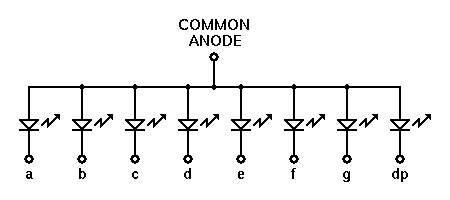
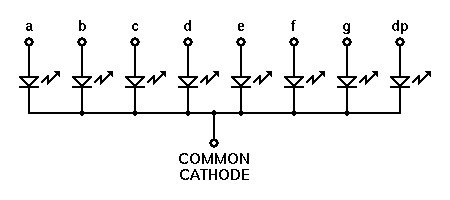
7segment Display driver IC selection and connection


7 segment display are of type common:

  1. Common Anode
  2. Common Cathode
Display can be:
  1. Single Digit
  2. Multiple multiplexed digits
In these cases, the current to be driven through these segments and digits is more as compared to the current source/ sink capacity of micro-controller GPIO pins. Hence the drivers come in to picture.

Drivers are of types:
  1. HIGH side driver IC (UDN2981)
  2. LOW side driver IC (ULN2803)
Common anode configuration:
  1. It is better to go with LOW side driver, as the cathode of each segment can be connected to separate darlington pair inside driver IC to sink the current.
  2. At the anode side, single PNP(BC557) transistor can  be connected. In case of multiple digits, separate PNP transistors to be connected for each digit. 
  3. Base of each transistor will be controlled by GPIO through a series base resistor
  4. GPIOs will also be connected to driver input through a series current limiting resistor
Common cathode configuration:
  1. It is better to go with HIGH side driver, as the anode of each segment cab be connected to separate darlington pair inside driver IC to source the current.
  2. At the cathode side, single NPN (BC547) transistor can  be connected. In case of multiple digits, separate NPN transistors to be connected for each digit.
  3. Base of each transistor will be controlled by GPIO through a series base resistor
  4. GPIOs will also be connected to driver input through a series current limiting resistor

In both cases care to be taken:

  1. Care should be taken that only 1 digit is ON at a time.
  2. All n-digits can be displayed by maintaining high refresh rate of the display (eg. 180Hz)
  3. Based on Vce voltage and Isource/sink, the Power(Pd) dispation through every pin of driver can be estimated. Pd(W) * (degC/W) rating of the driver should be less than the Maximum junction temperature rating of  the driver. Otherwise driver IC is on the "Stairway to heaven" :)
More better option,
  1. There are also driver IC options like MAX7219, which have both the HIGH side and LOW side driver in the package. 
  2. MCU communicate to driver over SPI, sending digit to be displayed.
  3. Driver takes care of refresh rate (eg. 500Hz for 8 digits)
  4. Driver handles the intensity of digiti display (Layman terms  'brightness')
  5. MCU dont need to update all digits at all time, even if one digit in the number is to be modified.
Diagram where all options are merged into one:

Wednesday, September 14, 2016

JTAG, SWD and debugWIRE: How are they different ? Its always a question ..... Let me clarify

JTAG - Joint Test Application Group
- Its used for verifying design and testing PCB after manufacturing
- Its referred as IEEE Standard 1149.1
- Standard Test Access Port and Boundary-Scan Architecture
- Programming and debugging both can be done using JTAG

Physical interface:

  1. TDI (Tets Data In)
  2. TDO (Test Data Out)
  3. TCK (Tets Clock)
  4. TMS (Test Mode Select)
  5. TRST (Test Reset)
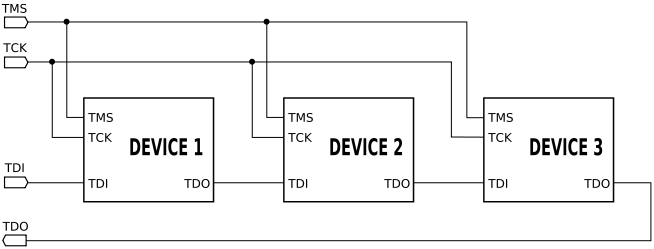
Daisy chain way of using JTAG

Example of JTAG chain


SWD - Serial Wire Debug

Serial Wire Debug (SWD) is debug port for microcontroller where package is small, or small number of pins.
Its used mostly in ARM architecture chips
SWD is availabel as a part of Core Sight Debug access port
Compatible with all ARM processors, and any processor that uses JTAG
- Programming and debugging both can be done using SWD
Physical interface: 
  1. SWCLK (Serial Wire Clock)
  2. SWDIO (Serial Wire Data In and Out)
In case when SWD is used for JTAG based process
  1. SWCLK --> TCK
  2. SWDIO --> TMS
With SWD protocol, the debugger is connected to AMBA bus as another master, using which debugger can access ARM core system and peripheral memory

NOTE:
Ofcourse, VCC and GND need to be common between In-Circuit-Debugger/Programmer and Processor

SWO (Serial wire out) wire is used sometimes along with SWCLK and SWDIO.
Some of the programmer and debuggers like STLINK provide debugging utility like printf(), which are very useful. These utilities use SWO wire to send serial data over it to PC. But here you need to set the system clock value correctly in the serial debug viewer configuration on PC.

debugWIRE

debug WIRE is a single wire interface provide in most Atmel AVR microcontrollers.
Its even more beneficial compared to JTAG and SWD as its very useful in places where package pin count is very small. On-Chip-Debugger (OCD) is provided on silicon itself by Atmel. dW single wire is internally connected to OCD. Whenever BREAK instruction (Software breakpooint) or (Hardware breakpoint) is observed by OCD, the CPU core operation is stopped and halted. All the SRAM, Peripheral register values, IO status information is sent by OCD over dW wire to the External Debugger unit(JTAGICE3). It will convert dW information to USB so that information could be sent to PC. On PC there will be a Debug software program which will grab the data and display it. Debug software running on PC will be a part of AtmelStudio.
- Only debugging both can be done using debugWIRE
- SPI interface is used for programming where dW debug interface is used


Physical interface:
Single wire dW.
Its a alternate functionality for RESET pin of the micro controller.

Microcontroller oscillator circuit working

 Circuit consists of two parts: an inverting amplifier that supplies a voltage gain and 180° phase shift and a frequency selective feedback path. The crystal combined with Cx and Cy form a tuned PI network that tends to stabilize the frequency and supply 180° phase shift feedback path. In steady state, this circuit has an overall loop gain equal to one and an overall phase shift that is an integer multiple of 360°. Upon being energized, the loop gain must be greater than one while the voltage at XTAL grows over multiple cycles. The voltage increases until the NAND gate amplifier saturates. At first glance, the thought of using a digital NAND gate as an analog amplifier is not logical, but this is how an oscillator circuit functions.


PROFILE

My photo
India
Design Engineer ( IFM Engineering Private Limited )

Followers