Showing posts with label Interesting Stuff. Show all posts

Tuesday, January 26, 2016

How to remove LINUX and GRUB Bootloader using Windows environment ????

Along with existing Windows OS, many of us usually install Linux on our machine. But it so happens that GRUB Bootloader gets installed automatically in the boot process. It provides options of either selecting Windows / Linux based OS.

Now when we want to delete/ upgrade linux from our machine, we face problem of 


  • How to do it?
  • How do I remove the existing Linux from my machine ?
  • How do I remove GRUB bootloader from the boot process ?


No need to worry...... Here is the solution for you.


Its a simple two step process:

1. Remove the linux partition from the disk

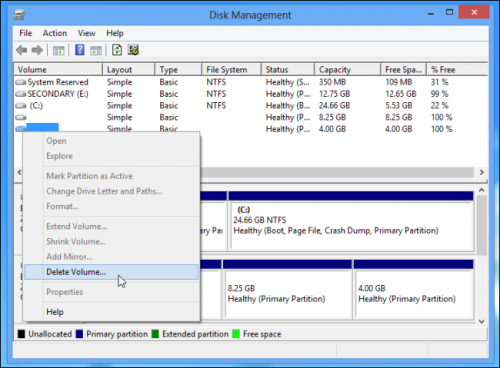
  • Open "disk management" on windows
  • Delete the Linux partitions
disk management windows 8
  • If you want merge them with the existing windows partitions for use. 
  • By doing this the linux is OUT from your disk


2. Removing GRUB Bootloader from the boot process

  • Here you first need to prepare Recovery disk from windows
  • Go to System recovery option in control panel: Control Panel->System and security -> Backup and restore -> Create a system repair disc
  • Now insert a cd/dvd, select it and create recovery disc
  • Once recovery disc is created restart PC and enter BIOS setup
  • Change boot priority: Boot from CD
  • Once the windows boot from CD, go to "System recovery options" -> Command Prompt
System Recovery Options USB
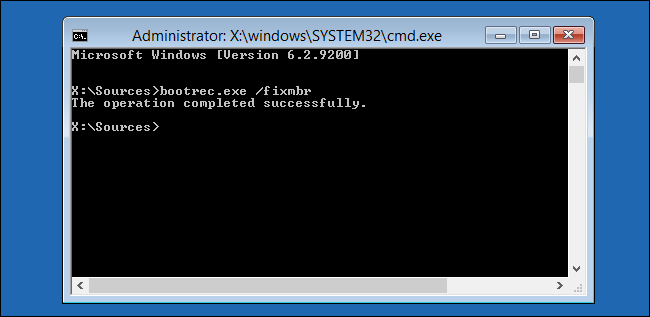
  • Enter command: bootrec.exe /fixmbr
cmd bootrec fixmbr
  • This will execute immediately and you will get the message "The operation completed successfully"
  • Restart PC and change boot priority to HDD to boot to Windows
NOTE:
The recovery disk CD/DVD that you have prepared can be labelled something like Repair disc Windows 7 64-bit or something different as per your system. This would be helpful for resolving such kind of mess :)

Thursday, January 7, 2016

DOLBY DIGITAL

When speaking of DOLBY DIGITAL, its actually the method of storing data by using "image correlation". Data is stored on film.
Tradition, the sound data was stored optically on film by varying light beam thickness.
But the crux of Digitl Dolby is that multichannel data can be stored with this technique. Using this stereo sound can be generated for 2.1 or 5.1 sound systems.

Dolby Digital, formerly known as AC-3, is a digital audio coding technique that reduces the amount of data needed to produce high quality sound.
Dolby Digital takes advantage of how the human ear processes sound.
When coding noise is close to the frequency of an audio signal, that audio signal masks the noise so that the human ear hears only the intended audio signal.
Sometimes the coding noise is not in the same frequency of an audio signal and must be reduced or eliminated.
By reducing, eliminating, or masking the noise, the amount of data is reduced to one tenth of the data on a compact disk (CD).
Dolby Digital is used with digital versatile discs (DVDs), high definition television (HDTV), and digital cable and satellite transmissions.
It has been selected as the audio standard for digital television (DTV).
The European DVB standard does not use Dolby Digital for audio, but instead uses MPEG standard technology for both the audio and video signals.

Dolby Digital provides five full-bandwidth channels, front left, front right, center, surround left, and surround right, for true surround sound quality.
A low frequency effect (LFE) channel is included that provides the sound needed for special effects and action sequences in movies.
The LFE channel is one-tenth of the bandwidth of the other channels and is sometimes erroneously called the subwoofer channel.
This multichannel scheme is known as 5.1 channel.

35mm, 70mm, IMAX, 4K ...???.. Here is some clarification

==================================
Video data are of two basic types:
==================================
1. Analog
2. Digital

1. Analog:
Analog video filming are broadly categorised in 35mm and 70mm.
-35mm film: Normal analog film
-70mm film: IMAX (Image maximum) film. Its almost 3 times better clarity compared to 35mm.
Project instrument required for 70mm film projection are also different compared to 35mm.

2. Digital:
-240p/ 360p/ 480p: Basic digital video recording
-HD (High definition) 720p (1280 x 720)
-FHD (Full high definition) 1080p (1920 x 1080)
-QHD (Quad high definition) 1440p (2560 x 1440)
-2k (2048 x 1080)
-UltraHD:
- UHD 4k (4096 x 2160)
- FUHD 8k (7680 x 4320)
- QUHD 16k (15360 x 8640)

In normal analog theaters, 35mm film is projected.
In normal digital theaters, 2k/ 4k films are projected. Here, the theater screen is coated with some material to increase the light reflection inorder to improve the viewing experience.
Its mentioned in terms of GAIN. GAIN1, GAIN2 or GAIN3.

Now a days, IMAX(70mm analog) also comes in IMAX-digital. But, when IMAX is mentioned, its usually IMAX 70mm analog.
IMAX image clarity is too good. The crowd sitting in front row can also have the best image clarity without blurring

Viewing experience of IMAX is way awesome compared to any of the three: 35mm, 2k, 4k
But if put to compare, the viewing experience goes improving left to right:
35mm -> 2k -> 4k -> IMAX

PROFILE

My photo
India
Design Engineer ( IFM Engineering Private Limited )

Followers