Monday, February 1, 2016

Basic concepts when it comes to OOPs...


"classes and objects" is the base when it comes to OOP
classes in C++ are very similar to structures in C

Important points
  1. class members
  2. access modifiers
  3. constructor (eg. classname(){...})
  4. destructor (eg. ~classname(){...})
  5. copy constructor
  6. friend function
  7. inline function
  8. 'this' pointer

Concepts / Aspects / Features :
  1. Inheritance (parent/base class & child/derived class)
  2. Overloading - (The definition of the function must differ from each other by the types and/or the number of arguments in the argument list. You can not overload function declarations that differ only by return type.)
    • function overloading
    • operator overloading (important aspect of C++)
    • overload resolution
  3. Polymorphism (functions with same name but different data types of input parameters and/or return types)
    • static resolution / static linkage / early binding (the call of the function is being set once by the compiler as the version defined in the base class)
    • Virtual function - keyword 'virtual': (the compiler looks at the contents of the pointer instead of it's type) - dynamic linkage / late binding
      • Pure Virtual Function (eg. virtual int area() = 0; //The = 0 tells the compiler that the function has no body and above virtual function will be called pure virtual function.)
  4. Abstraction
    • interfaces
    • implementations
  5. Encapsulation (public, private, protected)
    • data encapsulation (data hiding)
    • data abstraction
  6. Interfaces
    • abstract class (class with at least one Pure Virtual function.  The purpose of an abstract class is to provide an appropriate base class from which other classes can inherit. Abstract classes cannot be used to instantiate objects and serves only as an interface.  )
A step further...
  1. namespaces
    • defining namespaces
    • using namespaces
    • Dis-contiguous namespaces
    • Nested namespaces
  2. templates (A template is a blueprint or formula for creating a generic class or a function. The library containers like iterators and algorithms are examples of generic programming and have been developed using template concept.)
    • function template: typename
    • class template: class
  3. dynamic memory
    • new (eg. float *f1 = new float;) - The malloc() function from C, still exists in C++, but it is recommended to avoid using malloc() function. The main advantage of new over malloc() is that new doesn't just allocate memory, it constructs objects which is prime purpose of C++.
    • delete
  4. exception handling
    • try
    • throw
    • catch
  5. files and streaming
    • ofstream - create and write to file
    • ifstream - read information from file
    • fstream - capability of both ofstream and ifstream
    • open()
    • close()
  6. signal  handling
    • signal() - to trap unexpected events
    • raise() - generate signals
  7. multi threading
    • create thread
    • terminate thread
    • passing arguments to thread
    • join thread
    • detach thread

Friday, January 29, 2016

Operating system: Process vs Threads


Differences
  1. Creation of thread faster than creation of process
  2. Switching between threads faster than switching between processes
  3. Variables can be shared between threads of same process hence data sharing in threads is easy as compared to process. Processes don't share a common memory space hence schemes like Pipes and Queues need to be used for data communication

Applications

Threads
  1. Almost all softwares that we run on PC, like microsoft office, adobe pdf reader, eclipse etc. they create a single process and inside process they create multiple threads - GUI handling, back end processing, event handling etc.
  2. This is because processes as slower in all aspect as mentioned above and eventually application will be slow performing. Hence in these cases multi-thread creation is a better option as compared to multi-process creation
  3. There are two types of threads:
    • Kernel level thread (Thread model - One to one)
      • Advantages: 
        • Best suited when thread blocking comes into play
        • One blocked thread does not block the whole process. Multithreading and multiprocessing hardware is actually used in this case
      • Disadvantage:
        • Slow as compared to User level threads
        • Overhead of thread management
      • Example: PThread
    • User level thread (Thread model - Many to one)
      • Adavantges:
        • Best suited for non-blocking thread
        • Fast execution as compared to kernel threads
        • Fast thread creation, switching, synchronization etc.
        • Kernel is not aware of threads created in user level
      • Disadvantages:
        • Mutlithreading and multiprocessing hardware is not used
        • If one thread blocks the process is blocked
  4. Protecting shared resources
    • Mutex(Mutual Exclusion) - Thread resource sharing serialization
    • Probable problems - 
      • Deadlock - Thread1 acquire lockA, and demands lockB. Thread2 acquire lockB and demand lockA. This is the scenario where deadlock occurs.
      • Race condition - Unsynchronizaed access to shared resource can cause inconsitency in the shared data
      • Priority Inversion - When a LOW priority thread acquires a lockA, and is doing some operation. At teh same time if HIGH priority thread want to acquire the same lockA, then is halts at the point waiting to get lockA. Here, even though the demanding thread is of HIGH priority it has to wait until LOW priority thread release the lockA. Thus the problem of Priority Inversion. In the mean time, if a MEDIUM priority thread want to execute and that doesnt need lockA, then it takes over and LOW thread is halted, which is even a more twist in the story. To avoid this, Priority inheritance and Priority Ceiling are used.
  5. Thread synchronization primitives
    • Join
    • Condition Variable
    • Barrier
    • Spinlocks
    • Semaphores
Processes
  1. Multiple process creation is a better option in scenarios where completely separate memory areas for task as required. Example: The chromium project. its a web browser, where separate processes are created for every tab you create. This is to protect the overall application from bugs and glitches in the rendering engine. This brings to web browsing the benefits that memory protection and access control brought to operating systems.
  2. If your application will consist of separate, individually-usable components that communicate through well-defined protocols, each of which performs jobs that can individually succeed or fail without complicating the logic of the other components, then it's perfectly reasonable to write an application that utilizes multiple processes.

Tuesday, January 26, 2016

How to remove LINUX and GRUB Bootloader using Windows environment ????

Along with existing Windows OS, many of us usually install Linux on our machine. But it so happens that GRUB Bootloader gets installed automatically in the boot process. It provides options of either selecting Windows / Linux based OS.

Now when we want to delete/ upgrade linux from our machine, we face problem of 


  • How to do it?
  • How do I remove the existing Linux from my machine ?
  • How do I remove GRUB bootloader from the boot process ?


No need to worry...... Here is the solution for you.


Its a simple two step process:

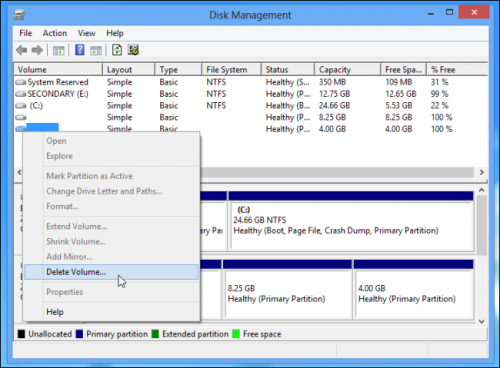
1. Remove the linux partition from the disk

  • Open "disk management" on windows
  • Delete the Linux partitions
disk management windows 8
  • If you want merge them with the existing windows partitions for use. 
  • By doing this the linux is OUT from your disk


2. Removing GRUB Bootloader from the boot process

  • Here you first need to prepare Recovery disk from windows
  • Go to System recovery option in control panel: Control Panel->System and security -> Backup and restore -> Create a system repair disc
  • Now insert a cd/dvd, select it and create recovery disc
  • Once recovery disc is created restart PC and enter BIOS setup
  • Change boot priority: Boot from CD
  • Once the windows boot from CD, go to "System recovery options" -> Command Prompt
System Recovery Options USB
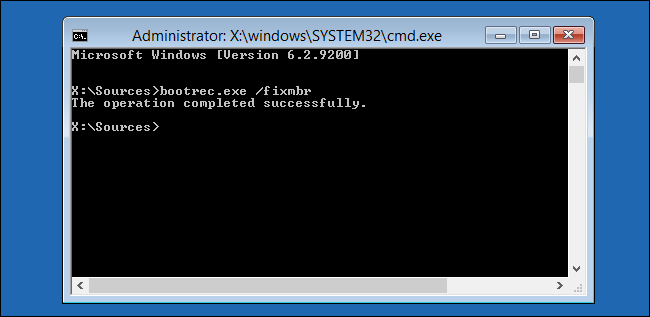
  • Enter command: bootrec.exe /fixmbr
cmd bootrec fixmbr
  • This will execute immediately and you will get the message "The operation completed successfully"
  • Restart PC and change boot priority to HDD to boot to Windows
NOTE:
The recovery disk CD/DVD that you have prepared can be labelled something like Repair disc Windows 7 64-bit or something different as per your system. This would be helpful for resolving such kind of mess :)

Thursday, January 7, 2016

DOLBY DIGITAL

When speaking of DOLBY DIGITAL, its actually the method of storing data by using "image correlation". Data is stored on film.
Tradition, the sound data was stored optically on film by varying light beam thickness.
But the crux of Digitl Dolby is that multichannel data can be stored with this technique. Using this stereo sound can be generated for 2.1 or 5.1 sound systems.

Dolby Digital, formerly known as AC-3, is a digital audio coding technique that reduces the amount of data needed to produce high quality sound.
Dolby Digital takes advantage of how the human ear processes sound.
When coding noise is close to the frequency of an audio signal, that audio signal masks the noise so that the human ear hears only the intended audio signal.
Sometimes the coding noise is not in the same frequency of an audio signal and must be reduced or eliminated.
By reducing, eliminating, or masking the noise, the amount of data is reduced to one tenth of the data on a compact disk (CD).
Dolby Digital is used with digital versatile discs (DVDs), high definition television (HDTV), and digital cable and satellite transmissions.
It has been selected as the audio standard for digital television (DTV).
The European DVB standard does not use Dolby Digital for audio, but instead uses MPEG standard technology for both the audio and video signals.

Dolby Digital provides five full-bandwidth channels, front left, front right, center, surround left, and surround right, for true surround sound quality.
A low frequency effect (LFE) channel is included that provides the sound needed for special effects and action sequences in movies.
The LFE channel is one-tenth of the bandwidth of the other channels and is sometimes erroneously called the subwoofer channel.
This multichannel scheme is known as 5.1 channel.

PROFILE

My photo
India
Design Engineer ( IFM Engineering Private Limited )

Followers