Wednesday, April 20, 2016

IPC: Message queue with example

Message queue

Message queue is a type of inter process communication. It is used to transfer data between processes. It is asynchronous communication as in, sender can dump data in queue, and receiver can get the data out at its convenience.
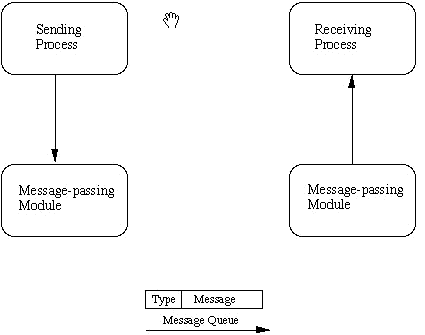
Parameters of queue:

  1. Queue ID
  2. Key
  3. Message structure:
    • type
    • text

Method calls:

  1. msgget()
  2. msgsnd()
  3. msgrcv()

Applications:

  1. VxWorks and QNX encourage the use of message queue for inter-process & inter-thread communication
  2. It provides resilience functionality as the message dont get "lost" in communication in case of system failure.

Example:

Sender code - creates queue and enter message into it with a particular key
Receiver code - Access the queue, gets the message and prints the text. If while receiver process execution data is not available in queue, it waits at msgrcv(), and proceeds when it gets some data.

Shell command to view the queue IPC
$ipcs -q

*******************************
sender.c
*******************************
/*
 * sender.c
 *
 *  Created on: 19-Apr-2016
 *      Author: root
 */

//IPC_msgq_send.c

#include <sys/types.h>
#include <sys/ipc.h>
#include <sys/msg.h>
#include <stdio.h>
#include <string.h>
#include <stdlib.h>
#define MAXSIZE     128

void die(char *s)
{
  perror(s);
  exit(1);
}

struct msgbuf
{
    long    mtype;
    char    mtext[MAXSIZE];
};

main()
{
int count = 0;
//char data[3][MAXSIZE] = {"first", "second", "third"};
    int msqid;
    int msgflg = IPC_CREAT | 0666;
    key_t key;
    struct msgbuf sbuf;
    size_t buflen;

    key = 1234;

    if ((msqid = msgget(key, msgflg )) < 0)   //Get the message queue ID for the given key
      die("msgget");

    //Message Type
    sbuf.mtype = 1;

    printf("Enter a message to add to message queue : ");
    scanf("%[^\n]",sbuf.mtext);
    getchar();

    buflen = strlen(sbuf.mtext) + 1 ;

    while (count < 3){
    //*sbuf.mtext = data[count];
    //buflen = strlen(sbuf.mtext) + 1 ;
if (msgsnd(msqid, &sbuf, buflen, IPC_NOWAIT) < 0)
{
printf ("%d, %d, %s, %d\n", msqid, sbuf.mtype, sbuf.mtext, buflen);
die("msgsnd");
}
else
{
printf("Message Sent\n");
}
count++;
    }
    exit(0);
}

*******************************
receiver.c
*******************************
/*
 * receiver.c
 *
 *  Created on: 19-Apr-2016
 *      Author: root
 */

//IPC_msgq_rcv.c

#include <sys/types.h>
#include <sys/ipc.h>
#include <sys/msg.h>
#include <stdio.h>
#include <stdlib.h>
#define MAXSIZE     128

void die(char *s)
{
  perror(s);
  exit(1);
}

typedef struct msgbuf
{
    long    mtype;
    char    mtext[MAXSIZE];
} ;


main()
{
    int msqid;
    key_t key;
    struct msgbuf rcvbuffer;

    key = 1234;

    if ((msqid = msgget(key, 0666)) < 0)
      die("msgget()");


     //Receive an answer of message type 1.
    if (msgrcv(msqid, &rcvbuffer, MAXSIZE, 1, 0) < 0)
      die("msgrcv");

    printf("%s\n", rcvbuffer.mtext);
    exit(0);
}

--------------------------------------------------------------------------------------------------

OUTPUT:

$ ipcs -q

------ Message Queues --------
key        msqid      owner      perms      used-bytes   messages    


$./sender
Enter a message to add to message queue : text data to trasmit
Message Sent
Message Sent
Message Sent

$ ipcs -q

------ Message Queues --------
key        msqid      owner      perms      used-bytes   messages    
0x000004d2 0          root       666        63           3           

$./receiver
text data to trasmit

$ ipcs -q

------ Message Queues --------
key        msqid      owner      perms      used-bytes   messages    
0x000004d2 0          root       666        42           2           

$./receiver
text data to trasmit

$ ipcs -q

------ Message Queues --------
key        msqid      owner      perms      used-bytes   messages    
0x000004d2 0          root       666        21           1           

$./receiver
text data to trasmit

$ ipcs -q

------ Message Queues --------
key        msqid      owner      perms      used-bytes   messages    
0x000004d2 0          root       666        0            0           


Monday, March 7, 2016

ADC parameter understanding

ADC - Analog to digital converter

  1. Resolution: no. of bits (8/10/12/... bits)
  2. Input clock frequency (MHz)
  3. Pre scalar
  4. Sampling frequency
  5. Channels
  6. Single / Differential channel
  7. Vref (Reference voltage)
  8. VDD (Supply voltage)
Example: if input locking frequency for ADC is 18MHz
Prescalar values varying from 1, 2, 4, 8 to 64

Clock frequency = Input clock frequency / Prescalar
Sampling frequency = Clock Frequency / No. of clock required for single conversion

No. of clock required for single conversion = No. of bits + x
x = varies from ADC to ADC. But is usually 3 to 5 bits

So, in our case, if its a 12-bit ADC and x=6 and prescalar = 1
then, 
Clock frequency  = 18MHz;
Sampling frequency = 18MHz/18 = 1Msps (1 mega samples per second)

EOC (End of conversion) line signal is present in each ADC and can be used as interrupt for ADC ISR.


If no of channels are more, then Time required for signal conversion further increases. In our case, if 8-channels are used, then

Conversion frequency = Sampling frequency / No. of channels

Resolution is achieved over the 0V to Vref range
Vref max limit = VDD
Usually minimum limit is also mentioned (Eg. 1.1V)

Successive Approximation Register(SAR) ADC:
In SAR, register of bits equal to no. of bits of ADC is used.
By using binary search pattern, it goes through all bits toggling from MSB to LSB and providing digital input to internal DAC. DAC generates the Analog voltage respectively which is used to compare with the input analog signal at the analog comparator stage. Sampled value is held until the complete conversion process is not complete. Once the conversion is complete, EOC signal is generated.


Voltage step = Vref / 2 ^ No. of adc bits
Hence,
Quantisation error range = +/- (Voltage step / 2)

ADC types:
  1. Successive approximation ADC (Sample and Hold type)
  2. Sigma delta ADC
DAC types:
  1. R-2R ladder

Sample and Hold (S/H) OR Track and Hold:
These are usually used for high conversion rate (i.e. high Msps) application. There are two steps in SAR ADC.: Sample and Conversion.


SAR ADC goes through following states for every iteration:


  1. Track mode: Here the output signal follows the input signal. "Slew rate" defines the signal following characteristic of the sampling capacitor.
  2. Track to Hold mode: Here the input is captured and kept constant. "Transient Settling Time" is an important parameter to onsider. Usually it is mentioned as "Sample time (ts)" in datasheet.
  3. Hold mode: Now the charge on the Capacitor Ch is held almost constant, during the conversion to digital value n-bit. Here, "Droop rate" is important parameter. It defines the charge holding capacity of the smapling capacitor.
  4. Hold to Track mode: Here the output signal starts following the input signal. "Acquisition Time" defines the time required for output signal to start following the input signal.
Hence, min. time for whole sample and hold cycle  (Tconv)=
Min.Sample time (Transient Settling time) + Approximation time + Acquisition Time

Max. sampling rate = 1/ Tconv

 - Sampling time is adjustable.
 - ADC clock frequency is usually variable
 - Hence, sampling rate (Ksps/ Msps) can be varied.

Manufacturers:

Most of the applications require ADC along with the processor to process the data.
There are requirements to fit these in small space. So usually we look for a MCU with good ADC functionality. In these cases, as per my experience, ST Microelectronics (STM32F302RB) provides the best solutions, in small cost. 
There are two or more ADCs inside the MCU. These ADC have excellent sampling rates around 5Msps in this case. There is special modes called "Dual interleaved" mode, where the both ADCs can be used to sample the same channel, With this, sampling rate can be doubles like around 10Msps. That's too great to get in cost of  2.5$ USD.
NOTE: Here you are suggested to use on board DMA for interleaved mode operation


Friday, February 26, 2016

C - structures, initialized and uninitialized variables


  1. Structure alignment
  2. Trailing structure padding
  3. Trailing padding in bit fields


Following is the best link to study "C Structures"

Lost art of C structure packing: http://www.catb.org/esr/structure-packing/

Initialized and uninitialized variables:

All local variables & pointers are "uninitialized"
Local variables declared as "static" are initialized to zero or NULL

All global variables & pointers are initialized

Difference between global variable and static global variable:

  • Normal global variable can be used in other C files by use of "extern"
  • Static global variable cannot be used outside the file
Multiple file C project:
  1. Architecture of such project should be like
    1. user_main.c
    2. user_header.h
    3. file1.c
    4. file1.h
    5. file2.c
    6. file2.h
    7. file3.c
    8. file3.h
  2. Variables declared by individual c file (file1.c, file2.c file3.c) should be defined in c files itself
  3. Variable declarations should be included as part of header files(file1.h file2.h file3.h) as "extern" if these varaibles are needed outside the c file.
  4. user_header.h should include all these header files(file1.h file2.h file3.h) in it, so as get access of all variables defined the source files(file1.c, file2.c file3.c)
  5. In case of functions, function definition in c files & function prototype in header files
Multiple file C project is best for situations where
  • You want to group methods depending on there functionality. And you are the one whole and sole developer for the project. Where you don't have to share any of your code to others.
Shared objects:
  • Situations where you have to share your code to others, but you want to keep your code functionality hidden
  • The executable prepared by using shared object is small in size, but needs the .so or .dll at the time of compilation and execution
  • The application(exe) is already prepared that uses shared object & we need to optimize the algorithm inside the dll with same function prototype, then we just need to compile new shared object and replace the old. By this exe doesn't need to be recompiled.
  • These techniques of modularization of code by shared objects is used for most softwares installed on PC
  • Code Architectures come into play as, the function prototypes need to be design as part of  main source code with lot of future vision and modular scope in mind. Hence to be a code architect, you need to have lot of experience at first.
  • If we need to link new shared object to exe, then the exe need to be recompiled with new dll linked to it.
Static objects:
  • Executable prepared with static linking, the size is larger as compared to shared object
  • They are with .a extensions in Linux
  • When a executable is prepared with linking to these object file, it is called static linking
  • The concept is used in preparing mobile application eg. Apple applications, where the rule is to prepare app with static linking, if it is intended to be available on AppStore
  • It provides security kind of feature, as at runtime exe doesn't depends on any external file like in case of shared objects
At runtime, the memory allocation (RAM) takes place in almost the same size in shared object and static linking. Just a difference of few bytes, as in shared objects the address of calling the function from required .so/.dll comes into picture
Plugins:
They are basically shared objects only, just the extension names are different.

Tuesday, February 23, 2016

Function pointer use & What are callback functions ??

Function pointers are basically used in callback function, to call a particular function when a event occurs.
Callback functions are ISR(interrupt service routines) when it comes to non-os based embedded systems.

Example of using funtion pointer in C program:

---------------------
user_main.c
---------------------
*
 * user_main.c
 *
 *  Created on: 23-Feb-2016
 *      Author: root
 */


#include <stdio.h>
#include <user_include.h>

int main(int argc, char *argv[]){
Demo d;
d.input_string = "Jon snow";
d.print_data_pointer = data_print_1;
printer_function(&d);
d.print_data_pointer = data_print_2;
printer_function(&d);
return 0;
}


void data_print_1(char *inp){
printf("\n You Know Nothing,... %s ", inp);
}

void data_print_2(char *inp){
printf("\n You know everything, ... %s", inp);
}

void printer_function(Demo *temp){
temp->print_data_pointer(temp->input_string);
}


----------------------
user_include.h
----------------------
/*
 * user_include.h
 *
 *  Created on: 23-Feb-2016
 *      Author: root
 */

#ifndef USER_INCLUDE_H_
#define USER_INCLUDE_H_

/*
 * typedef
 */
typedef signed char int8;
typedef unsigned char uint8;
typedef signed int int32;
typedef unsigned int uint32;

typedef struct{
void (*print_data_pointer)(char *);
char *input_string;
}Demo;

/*
 * Function declaration
 */
void data_print_1(char *);
void data_print_2(char *);
void printer_function(Demo *);

#endif /* USER_INCLUDE_H_ */


****** OUTPUT ******
You Know Nothing,... Jon snow 
You know everything, ... Jon snow

PROFILE

My photo
India
Design Engineer ( IFM Engineering Private Limited )

Followers